
 Julia Sakovich:
 18 mins
 Telegram has become the default platform for forex signal delivery, and the number of channels claiming to offer profitable trade ...
Trezor Safe 7 Review (2026): Fees, Safety & Who It’s Best For
Is the Trezor Safe 7 an essential part of any crypto protection plan, or simply an unnecessary upgrade to your existing setup? In this review of the Trezor Safe 7, we explore the new security features and upgraded system, to see if it's worth buying in 2026.
The new Trezor Safe 7 is the latest hardware wallet in the Trezor Safe series. Offering a fresh take on hardware crypto wallets it delivers wireless connectivity, next-gen security features, all in a self-custody device. Users can also integrate directly with the Trezor Suite allowing them to send, receive, stake and swap cryptos.
In our Trezor Safe 7 review, we’ll cover everything you need to know about this wallet: how it’s secured, what tokens it supports, and how much it costs, so you can decide if the Safe 7 is right for you in 2026. Let’s take a look at what we found.
Trezor Safe 7 Quick Verdict
| Category | Details |
| Overall Rating | ⭐9.0/10 |
| Price | $249 |
| KYC Required | No |
| Supported Assets | 9,000+ assets with Trezor Suite app |
| Display | 2.5” color touchscreen |
| Bluetooth | Yes |
| Compatibility | Windows, Mac, Linux, iOS, Android |
| Availability | 200+ countries, including the U.S. |
| Best For | Large crypto investors worried about post-quantum threats |
| Not Ideal For | Smaller crypto holders on a budget |
Verdict Summary
The Trezor Safe 7 is the first fully open-source dual-element wallet and the first hardware wallet with post-quantum cryptography. We had a great experience with the large 2.5” touch display and loved the addition of Bluetooth connectivity, although some users worried about its security. Overall, this is a wallet for large crypto holders who want maximum security and don’t mind the Safe 7’s high upfront cost.
Key Takeaways
Who Is the Trezor Safe 7 Best For and Who Should Avoid It?
Best For
- Crypto power-users who prioritize long-term key security
- Existing Trezor users who want a Bluetooth-enabled device
- First-time hardware wallet purchasers who want a premium device
Not Ideal For
- Crypto users on a tight budget
- Users who prefer air-gapped security
- Non-tech-savvy users who prefer a simple setup process
What Is Trezor?
Trezor is a hardware wallet maker established in 2013 in Prague by Marek Palatinus and Pavol Rusnak. It is a subdivision of Satoshi Labs, which makes additional crypto ecosystem products like mining pools and a peer-to-peer exchange.
Trezor has launched several iterations of hardware wallets, including its original Trezor One model and two earlier Trezor models, the Safe 3 and Safe 5. The Safe 7 launched in late 2025.
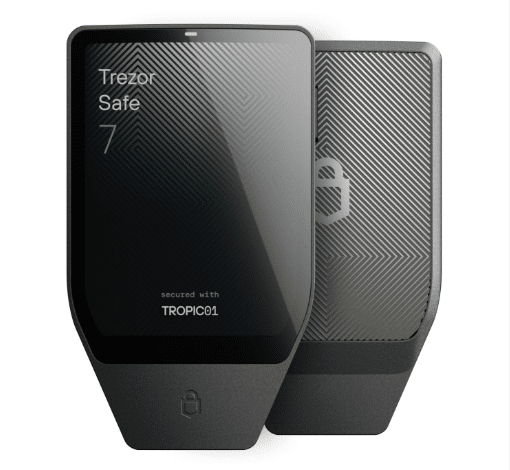
The company’s products have millions of users and there’s no substantiated instance of a Trezor device ever being remotely hacked. However, in 2020, Kraken found a way to hack older Trezor devices (including the Trezor One and Trezor Model T) using a technique known as voltage glitching. This attack requires physical access to a wallet and Trezor adapted its Safe models (starting with the Safe 3) to protect against this type of attack.
The Safe 3 was recently found to be vulnerable to a complex supply chain attack, but this only affects previously shipped devices that didn’t ship directly from Trezor. There are no known vulnerabilities in the Safe 5, Trezor’s most recent model before the new Safe 7.
Despite these security flaws, Trezor remains a long established hardware wallet manufacturer. The company has been praised for open-sourcing its chip design and eliminating non-disclosure agreements (NDAs) so that security researchers can fully probe Trezor wallets.
Trezor Safe 7 Pricing
The Trezor Safe 7 costs $249, making it one of the more expensive hardware wallets on the market today. However, it’s still far from being the most expensive, with Ledger’s Stax wallet costing $399. The Trezor Safe 5 is currently on sale for $129, making it a budget-friendly alternative with many of the same security features.
Trezor doesn’t charge any ongoing subscription or trading fees, although it does sell add-ons for the Safe 7 like a wireless charging station ($29), a privacy screen protector ($20), and a metal passphrase backup device ($99). A case for the Safe 7 is coming soon.
Trezor Safe 7 Security Features
The Safe 7 is promoted as Trezor’s most secure wallet yet, and we were impressed by some of Trezor’s innovative solutions for keeping your crypto safe. Here’s a closer look at what’s inside this wallet.
Dual Secure Element Protection
The Safe 7 is Trezor’s only hardware wallet to incorporate two secure element chips. One is the new TROPIC01 chip, which Trezor markets as the first fully auditable and NDA-free secure element. The second chip is an EAL6+ secure element, which is fully open-source and widely used for crypto cold storage.
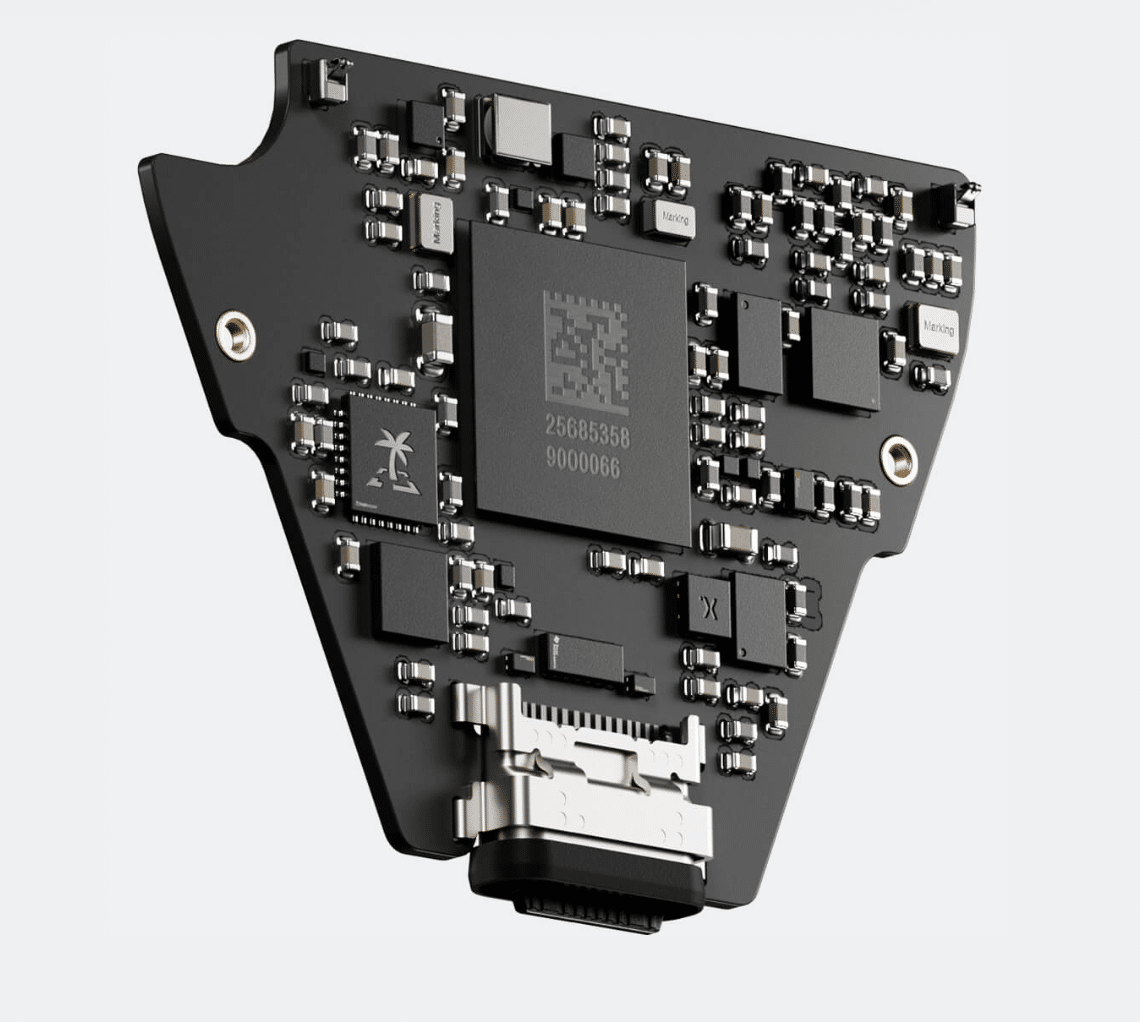
Breaking into the Safe 7 requires accessing both chips. That’s because one chip holds the encrypted wallet seed, while the other chip holds the keys needed to unscramble the encryption.In theory, this means the Safe 7 doesn’t currently have any known vulnerabilities in either chip.
The fact that the Safe 7’s chips are fully accessible to security researchers is also noteworthy. The chips used in many competing wallets, like Ledger wallets, are hidden behind NDAs (although Ledger wallets have also never been broken into remotely). Open-sourcing matters to a lot of crypto power users, so Trezor is doing a nice job of aligning with its audience with the Safe 7.
Post-quantum Cryptography
What really caught our attention about the Safe 7 is that Trezor claims it to be the first-ever hardware wallet to use post-quantum cryptography. It’s designed with a quantum computing-proof SLH-DSA-128 signature scheme, which verifies the authenticity of the bootloader and firmware when you turn on the wallet.
We expect that other wallet companies will follow Trezor’s lead now that this post-quantum signature scheme is available. But for now, Trezor leads in terms of protection against potential quantum threats, so the Safe 7 may appeal to users who are worried about the safety of older hardware wallets.
Transaction Signing and Backup
The day-to-day security measures found on the Safe 7 don’t look very different from those on the Safe 5. You can set a numeric PIN up to 50 digits and enter it directly on the device’s touchscreen to eliminate the risk of your computer being infected with a keylogger. You can also create a custom passphrase to create a hidden wallet inside your Safe 7. Anyone with access to your device must have your passphrase in order to transfer tokens. (Bear in mind that no one can help you recover your passphrase, so make sure you write it down somewhere safe.)
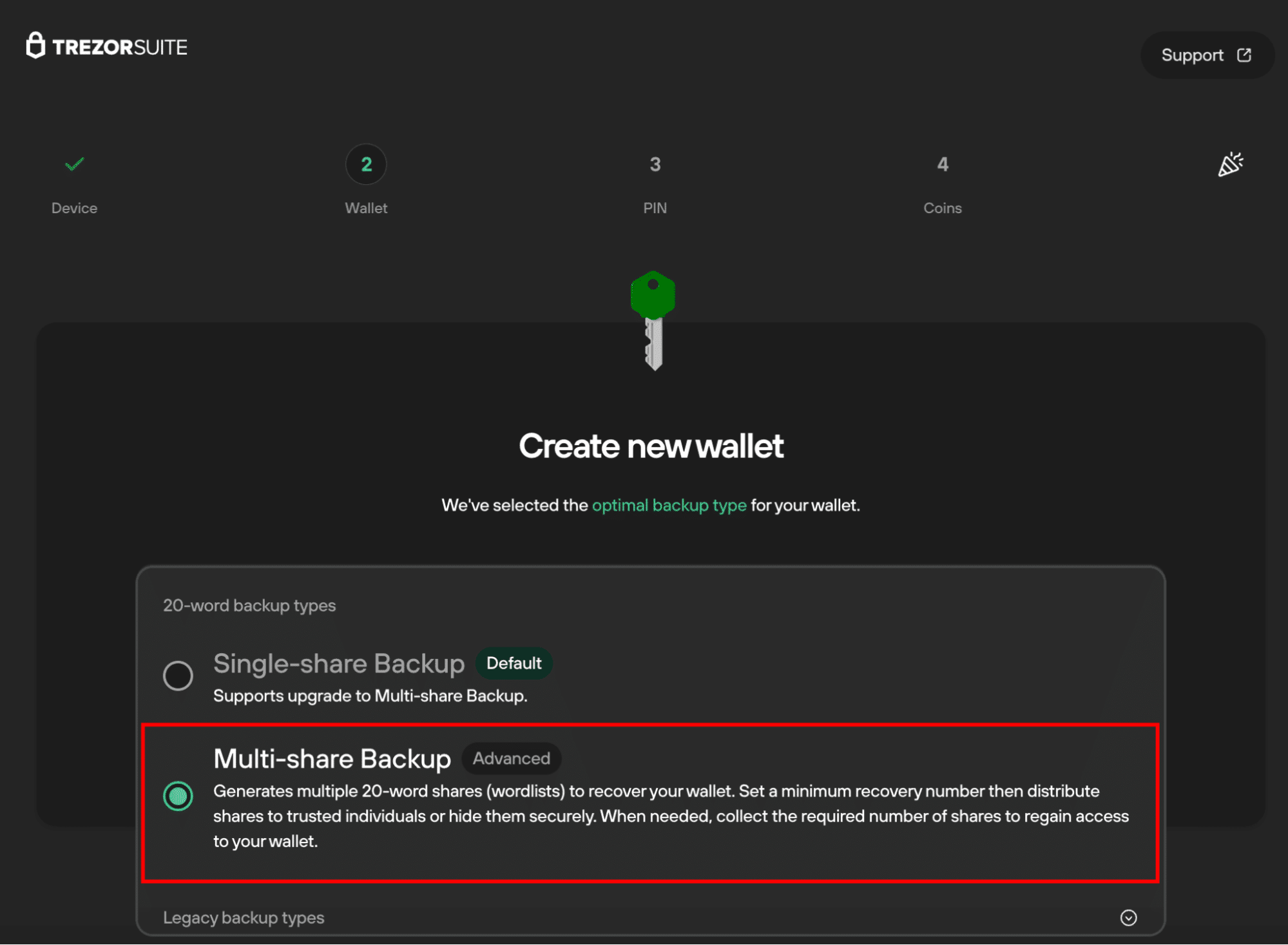
The Safe 7 supports 12-, 20-, and 24-word passphrases for backup and recovery. It also supports multi-share backup, which we really like. Multi-share enables you to create multiple 20-word passphrases and requires a minimum number of them (e.g., two or three passphrases) to be used to restore your wallet. You can store one passphrase at home, one in a bank vault, and one with a family member, for example. If someone breaks into your home and finds one of your passphrases, they still can’t gain access to your hardware wallet.
The only major difference between the Safe 7 and the Safe 5 that we found is that the Safe 7 doesn’t have a MicroSD slot. On the Safe 5, you could add another PIN to your wallet using a MicroSD card, such that the card had to be present in order for you to access your wallet. It was a neat feature that added an extra layer of security, but sadly it’s not available on the Safe 7.
Bluetooth Connectivity
The Safe 7 feature that drew more scrutiny from users than any other is its Bluetooth wireless connectivity. The Safe 7 is the first Trezor device to offer Bluetooth, although this is a common feature on many other hardware wallet models. Because of its Bluetooth receiver, the Safe 7 is not a fully air-gapped wallet.
The good news is that Trezor physically separated the Bluetooth functionality from the Safe 7’s secure element chips, ensuring that there’s no way to break into the device over Bluetooth. According to the company, there’s no difference in practice between connecting the Safe 7 to another device via Bluetooth or USB-C.
The Safe 7 also offers an option to turn off Bluetooth entirely through an on-device settings menu.
Two-factor Authentication (2FA)
Trezor also introduced a new feature with the Safe 7, allowing you to use the device for 2FA with your other apps and devices. You can implement Trezor as a 2FA device for any services that use FIDO2 or U2F protocols. We liked the thoughtfulness of this addition, although in practice unlocking our Trezor with a lengthy PIN was a lot more of a hassle than simply using a smartphone-based authenticator app for 2FA.
Trezor Safe 7 Construction
Trezor made some updates to the design and construction of the Safe 7 that we really like.
Battery
The most notable change to the Safe 7’s design is in the battery. Trezor ditched the typical Li-ion battery in favor of a lithium-iron-phosphate (LiFePO4) battery, which boasts a much longer life and supports Qi2 wireless charging. Notably, Trezor claims the battery will last through four times as many charge cycles as a standard Li-ion battery and can hold a charge for up to several years in between powering up your Safe 7 wallet.
Display
The Safe 7 also features a larger display than the Safe 5. The color touchscreen is now 2.5” (520 x 380 pixels) and built for high resolution. It’s protected with scratch-resistant Gorilla Glass 3, and Trezor also sells a screen protector as an optional add-on.
Compatibility
The Trezor Safe 7 is compatible with Windows, Mac, and Linux computers as well as iOS and Android mobile devices. Notably, the Safe 7 is fully compatible with iOS thanks to its Bluetooth connectivity. Past Trezor devices have been read-only on iOS when connected with a USB cable.
What Cryptocurrencies Are Supported on the Trezor Safe 7?
The Trezor Safe 7 comes in two versions: a standard version that supports more than 9,000 tokens and a Bitcoin-only version that’s limited to Bitcoin. We’ll focus on the standard version since that’s what the majority of crypto users are interested in.
The Safe 7 supports most major blockchains, including Bitcoin, all EVM networks that use ERC-20 tokens, Solana, and XRP. In addition, it offers limited support (storage and swapping only) for Tron, TON, Sui, Polkadot, Hedera, and Hyperliquid. If you hold large amounts of TRX, TON, or HYPE, this probably isn’t the best wallet for you.
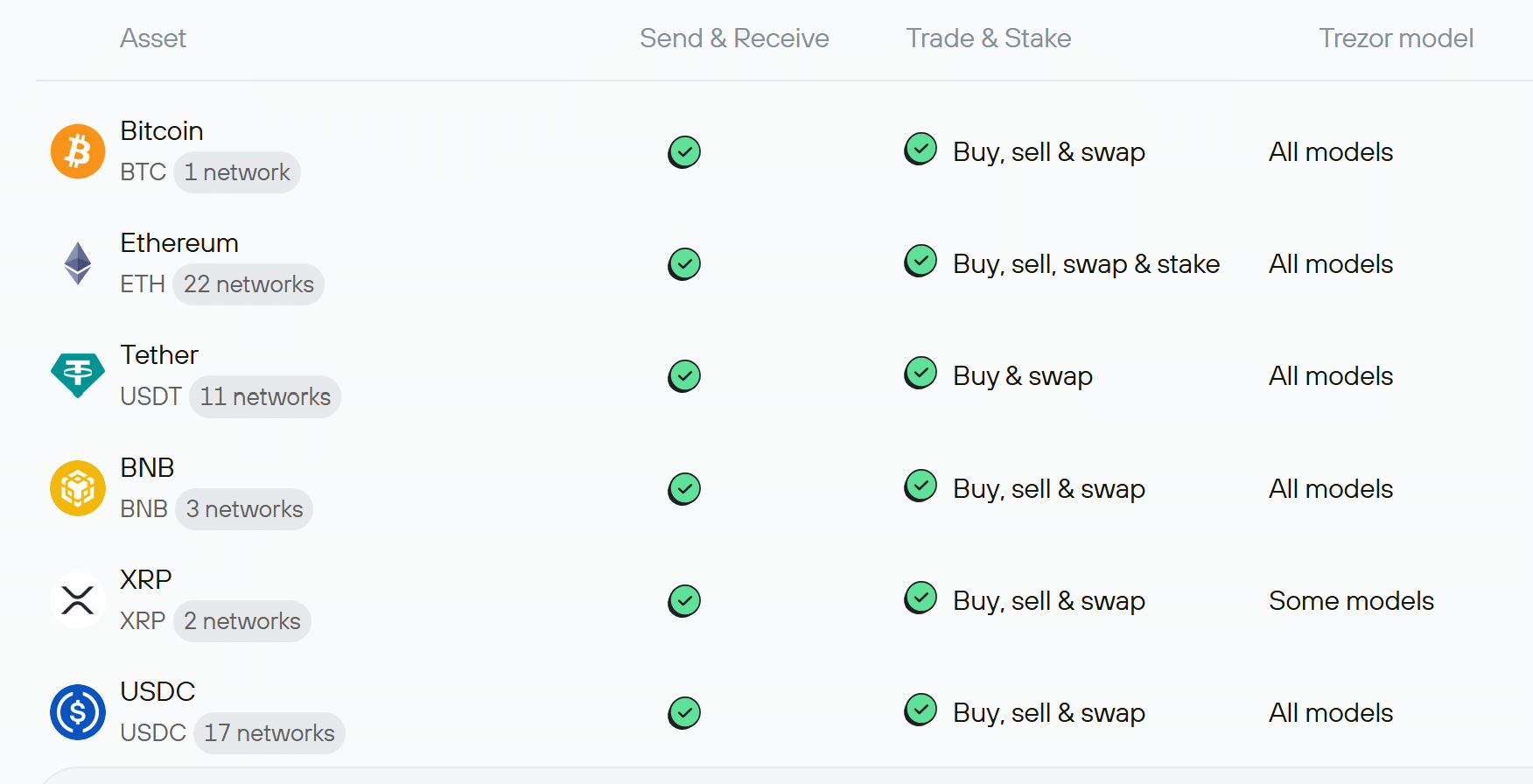
You can send, receive, buy, and swap supported tokens through the Trezor Suite app, which is available for desktop and mobile. The Safe 7 also integrates with 30+ third-party hot wallets and 70,000+ dApps (via WalletConnect).
Is the Trezor Safe 7 Easy to Use? A Look at the User Experience
We found the Trezor Safe 7 to be moderately easy to use, but it does require some technical knowledge and is far from the simplest hardware wallet available.
To start, the setup process is fairly quick, but it involves some steps that could trip up first-time users. You need to begin by verifying that your Trezor Safe 7 hasn’t been tampered with, which Trezor simplifies by using holographic tape to secure the device in its packaging. Next, you can install the Trezor Suite app and connect your device via USB-C.
Here’s where it can get tricky. You have to choose between single-share and multi-share wallet backup, then go through confirming your passphrase and PIN. Other decentralized wallets require these steps as well, but we thought Trezor could do a better job of explaining the various options and their security implications for novice users.
Once your wallet is set up, we found the device to be more beginner-friendly. The touchscreen is very responsive and we loved the haptic feedback when signing transactions. It made us feel more confident in the device, even if the haptics don’t actually have much meaning. The high-res display is crisp and the experience of navigating through menus felt a lot like using an iPhone.
There were two friction points we found in using the device, both of which were more annoying than problematic. First, Trezor designed the Safe 7 so that the number pad changes every time you’re prompted to enter your PIN (as opposed to displaying numbers in numeric order every time). This is to prevent wear on the device screen that could allow someone to guess your PIN, but it does take some patience to carefully enter your PIN using a different pad each time.
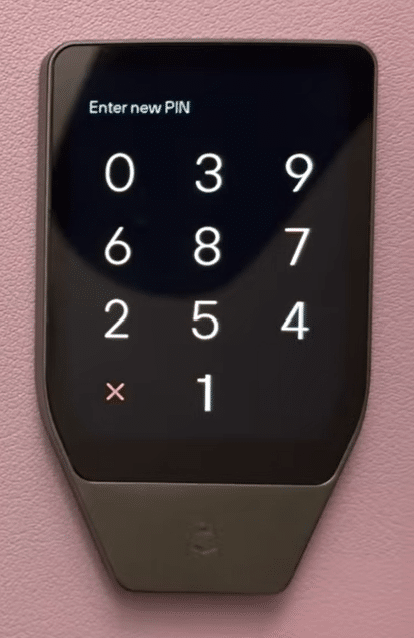
The second friction point was the keypad, which you’ll need to use if you create a hidden passphrase wallet. Rather than a smartphone-style keyboard, the Safe 7 uses a modified keyboard that groups letters together and requires you to multi-tap to cycle between them. It makes the process of entering passphrases a lot slower.
For the most part, though, we used the Trezor Suite app a lot more than we used the Safe 7 itself. The integration is very smooth and we liked that Trezor Suite lets you buy crypto and add it to your hardware wallet in a single step. When you want to receive crypto assets to your Safe 7 wallet, both the app and device will display your address so you can easily confirm it’s correct. You can also access all of the Safe 7’s settings from within Trezor Suite, so you really don’t have to use the device itself to do much.
Customer Support: Availability, Speed & Common Issues
Trezor offers customer support through a ticketing system only, and it typically takes 2-3 days to get a response. While that’s somewhat slow, the company has a user forum where you can ask questions and request new features. Trezor’s site also has a very in-depth online knowledge base complete with video tutorials, FAQs, and walkthroughs for common issues.
Trezor vs Alternatives: Which Hardware Wallet Should You Choose?
It’s worth comparing the Trezor Safe 7 against the Safe 5 as well as top crypto wallets from Ledger and Ellipal.
Trezor Safe 7 vs. Safe 5
The Safe 7 has a lot of design similarities to the Safe 5, but also some important differences under the hood. Whereas the Safe 7 uses two secure element chips and post-quantum cryptography, the Safe 5 uses a single EAL 6+ secure element and isn’t protected against quantum threats. The touchscreen is also much bigger on the Safe 7 – 2.5” vs. 1.54” – and the Safe 5 doesn’t support Bluetooth.
- Choose the Safe 7 if you want maximum protection and wireless capability.
- Choose the Safe 5 if you want the best value on a tighter budget.
Trezor Safe 7 vs. Ledger Flex
The Trezor Safe 7 and Ledger Flex are two identically priced wallets with different priorities. The Trezor Safe 7 is fully auditable and quantum-ready, whereas the Ledger Flex provides a bigger touchscreen and a more streamlined user experience. The Ledger Flex also comes with a PIN-protected passphrase storage card, but Ledger has faced criticism over its cloud-based seed backup in the past.
- Choose the Trezor Safe 7 if you prioritize post-quantum security and open-source tech.
- Choose the Ledger Flex if you plan to interact with your wallet primarily through the touchscreen.
Trezor Safe 7 vs. Ellipal Titan 2.0
The Ellipal Titan 2.0 is a more affordable wallet ($169) that’s fully air-gapped and uses a built-in QR code scanner to facilitate transactions. It features a 4” touchscreen and supports 40+ blockchains and 200+ dApps through WalletConnect. However, it uses a slightly older EAL5+ secure element.
- Choose the Trezor Safe 7 if you prefer Bluetooth connectivity and the latest security chips.
- Choose the Ellipal Titan 2.0 if you only trust air-gapped wallets and don’t need a wide range of dApp integrations.
Our Trezor Safe 7 review is based on hands-on testing. We purchased a new Safe 7 device directly from Trezor and set it up according to Trezor’s instructions. We then used it in combination with the Trezor Suite app to receive, swap, and send crypto on the Ethereum, Solana, and BNB blockchains. We tested connecting the Safe 7 by both USB-C and Bluetooth to an Android smartphone and a Windows desktop. Note that we didn’t pry open the Safe 7 to get a look at the secure elements inside. We’re taking Trezor’s word, backed by security researchers, that these fully auditable chips function as promised.
How We Tested the Trezor Safe 7
Final Verdict – Should You Use the Trezor Safe 7?
Our Trezor Safe 7 review found that this is an impressive new hardware wallet from one of the most trusted companies in the crypto industry. It’s the first wallet to use two secure element chips and the first to offer post-quantum cryptography, so the Safe 7 should reliably protect your crypto for many years to come. The wallet design is excellent and it builds on the Safe 5 with features like a longer-lasting battery, Bluetooth connectivity, and a larger display.
Still, the Safe 7 isn’t the perfect wallet for everyone. It’s pricey and the introduction of Bluetooth could be considered a security risk, even if Trezor says it’s not. In addition, the Safe 7 doesn’t fully support all major tokens (notably TRX, TON, and HYPE) and the touchscreen isn’t as user-friendly as we’d like it to be.
Overall, we recommend the Trezor Safe 7 for large crypto holders and power users who want maximum security, including protection against quantum threats. It’s also a great option if you’re looking to upgrade an older Trezor wallet or just want a premium and fully trustworthy hardware wallet.
FAQs
Is the Trezor Safe 7 safe?
Is the Trezor Safe 7 available in my country?
Is KYC required for the Trezor Safe 7?
What wallets does the Trezor Safe 7 integrate with?
Is Trezor legit?
Where can I buy the Trezor Safe 7?
Can a Trezor Safe 7 be hacked?
What are the cons of a Trezor Safe 7?
Should I get the Bitcoin-only Trezor?
What happens to my Safe 7 if Trezor goes out of business?
References
Coinspeaker in Numbers
250K+
Monthly Users
80+
Articles & Guides
5000+
Research Hours
23
Authors
guides
Best Forex Signals Telegram Groups & Channels in 2026
April 1st, 2026
Best Crypto Whitelabel Solutions in 2026
March 31st, 2026
5 Best Crypto Exchange APIs to Use in Your Business 2026
March 24th, 2026
Building a crypto exchange from scratch used to take months of development, six-figure infrastructure budgets, and a dedicated com...
Developers and businesses looking to integrate trading, swapping, or fiat on-ramps into their applications rely on crypto exchange...
Otar Topuria
Crypto Editor, 41 postsI’m a crypto writer and analyst at Coinspeaker with over three years of experience covering fintech and the rapidly evolving cryptocurrency landscape. My work focuses on market movements, investment trends, and the narratives driving them, helping readers what is happening in the markets and why. In addition to Coinspeaker, my insights and analyses have been featured in other leading crypto and fintech publications, where I’ve built a reputation as a thoughtful and reliable voice in the industry.
My mission is to demystify the crypto markets and help readers navigate the noise, highlighting the stories and trends that truly matter. Before specializing in crypto, I worked in the IT sector, writing technical content on software development, digital innovation, and emerging technologies. That made me something of an expert in breaking down complex systems and explaining them in a clear, accessible way, skills I now find very useful when it comes to unpacking the intricate world of blockchain and digital assets.
I hold a Master’s degree in Comparative Literature, which sharpened my ability to analyze patterns, draw connections across disciplines, and communicate nuanced ideas. I’m particularly passionate about early-stage project discovery and crypto trading, areas where innovation meets opportunity. I enjoy exploring how new protocols, tokens, and DeFi projects aim to disrupt traditional systems, while also evaluating their potential risks and rewards. By combining market analysis with forward-looking research, I strive to provide readers with content that is both informative and actionable.